![Simpled Logo Size-1.jpg]](https://learn.simpled.uk/hs-fs/hubfs/Simpled%20Logo%20Size-1.jpg?height=50&name=Simpled%20Logo%20Size-1.jpg)
Pairing the Keypad
Activate Pairing Mode
If the keypad is new:
-
Press any key on the keypad
-
The green light will flicker
-
The keypad is now in pairing mode
If the keypad has been paired previously:
-
Enter: 529#
-
The green light will flicker
-
The keypad has re-entered pairing mode
Once pairing mode is active, complete the pairing process in your app.
Changing the Keypad Battery
Follow the instructions shown in the product images here: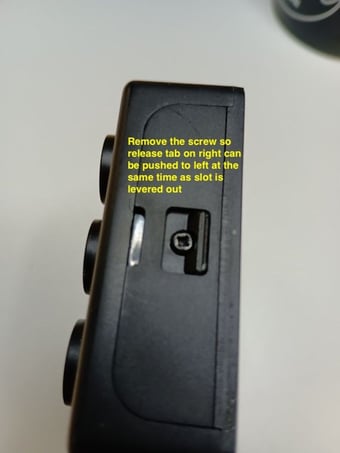
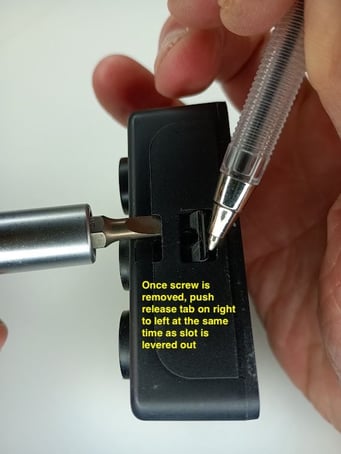
Follow the steps carefully to avoid damaging the casing.
Step 1 – Remove the Fixing Screw
-
Locate and remove the screw securing the keypad cover.
Step 2 – Release the Cover
Once the screw has been removed:
-
Push the release tab on the right-hand side toward the left
-
At the same time, gently lever the slot outward to release the cover
Please don't use excessive force.
Step 3 – Replace the Batteries
-
Remove the old batteries
-
Reinsert and tighten the screw
Weather Protection Notice
The Simpled Wireless Keypad is not certified as weatherproof.
If installed outdoors, additional protection is recommended.
Third-party keypad rain covers are widely available and can be purchased from retailers such as Amazon.