![Simpled Logo Size-1.jpg]](https://learn.simpled.uk/hs-fs/hubfs/Simpled%20Logo%20Size-1.jpg?height=50&name=Simpled%20Logo%20Size-1.jpg)
The Matter ID for the Simpled MG Matter enabled WiFi Bridge is printed on the product label on the back of the device. On this label, you will see a Matter QR code, and the Matter ID is written directly below that QR code. This information is used for Matter onboarding, pairing, and device identification across platforms such as Apple Home, Google Home, and Alexa.
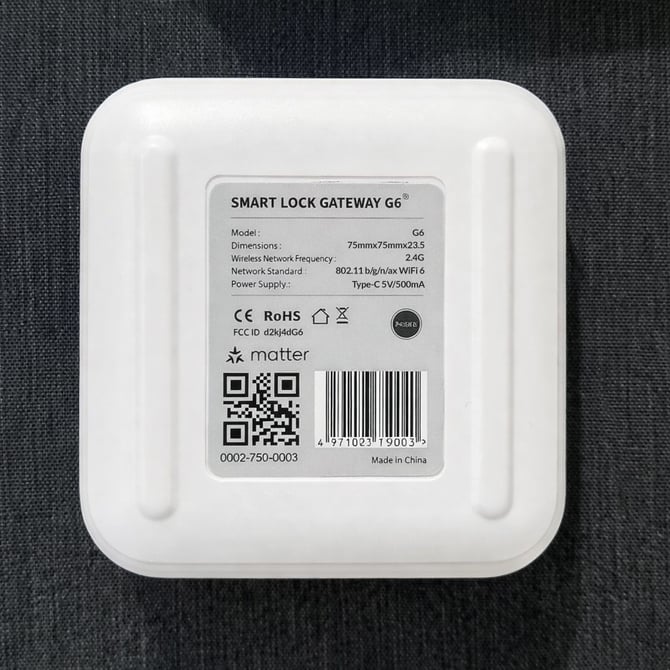
The QR code on the MG Bridge is not used for Simpled or TTLock. Our devices are added inside the app via Bluetooth discovery, and the bridge is linked through the app after the lock has been added. The QR code and Matter ID are only for Matter ecosystem pairing and are not required for TTLock setup.
For Matter pairing across smart home platforms:
Apple Home
Open the Apple Home app, tap Add Accessory, then scan the Matter QR code on the back of the bridge. If scanning is not possible, select Enter Code Manually and type the Matter ID printed below the QR code.
Google Home
Open the Google Home app, tap Devices, then Add Device and Set up a Matter device. When prompted, scan the Matter QR code on the back of the bridge or enter the Matter ID manually.
Amazon Alexa
Open the Alexa app, go to Devices, tap Add Device, then choose Matter. Follow the on screen setup steps and scan the Matter QR code on the back of the bridge when prompted. You can also enter the Matter ID manually if required.