![Simpled Logo Size-1.jpg]](https://learn.simpled.uk/hs-fs/hubfs/Simpled%20Logo%20Size-1.jpg?height=50&name=Simpled%20Logo%20Size-1.jpg)
What you’ll need
-
The 2.5 mm Allen key (hex spanner) supplied with your lock
-
Replacement batteries (correct type as specified in the manual)
Step-by-step instructions
-
Locate the Allen key
Find the 2.5 mm Allen key included in the screw bag supplied with your lock. -
Undo the fixing bolt
Insert the Allen key into the bolt hole on the reverse side of the inside handle and loosen the bolt.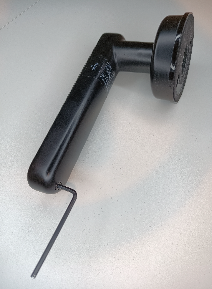
-
Remove the battery cover
Once the bolt is loose, carefully remove the battery cover. -
Replace the batteries
Insert the new batteries, ensuring the polarity (+/–) matches the markings. -
Refit the cover
Place the battery cover back on and tighten the bolt securely using the Allen key.
Done!
Your Leverline lock should now be powered and ready to use.