![Simpled Logo Size-1.jpg]](https://learn.simpled.uk/hs-fs/hubfs/Simpled%20Logo%20Size-1.jpg?height=50&name=Simpled%20Logo%20Size-1.jpg)
The OA-SP keypad combines:
- Keypad entry
- Fingerprint sensor
- Fob / Tag / Card reader
It connects to your lock as a Bluetooth remote control.
This guide shows you how to:
- Open the keypad
- Reset (initialize) it correctly
- Insert the batteris
- Install it securely on the wall
⚠️ Follow each step exactly. Missing steps will prevent the device from working.
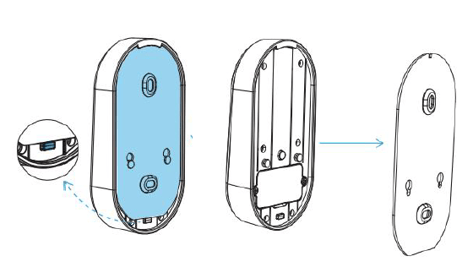
Step 1: Open the Keypad Panel
- Locate the release button at the base of the keypad
- Press the button (it is slightly recessed)
- At the same time, slide the panel out
-jpg-1.jpeg?width=472&height=461&name=OA%20Keypad%20-%20Cover%20release%20button%20(Push%2c%20hold%2c%20then%20slide%20unit%20up)-jpg-1.jpeg)
Step 2: Reset / Initialize the Device
⚠️ This step is required before setup
Follow carefully:
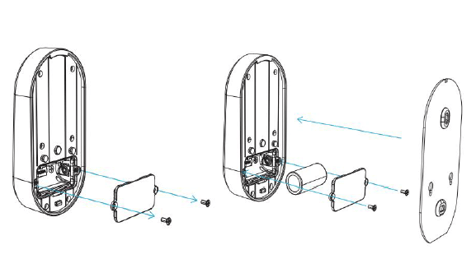
- Loosen and remove the battery cover screws
- Remove the battery cover
- Locate the tamper (“pick-proof”) button above the battery compartment
-png.png?width=452&height=239&name=OA%20Back%20panels%20(Labelled)-png.png)
Reset process and battery insert:
- Press and hold down the tamper button
- While holding the button, insert the battery
- Keep holding the button
Listen for sounds:
- Continue to hold the button down for 5 seconds after you put the battery in, until you hear the first beep, then two beeps
-
Straight after the two beeps, release the button
✅ Initialization is now complete
- Replace the battery cover
- Tighten the screws securely
Step 3: Attach the Keypad to the Wall Plate
- Align the two studs on the keypad with the larger openings on the mounting plate
- Insert the studs into position
- Slide the keypad upwards
✅ You will feel it click into place when secured
Important Notes
- The reset step must be done correctly or the keypad will not function
- Always wait for both beeps before releasing the button
- Ensure the panel is fully clicked into place after installation
Still Not Working?
If the keypad does not respond:
- Repeat the reset process carefully
- Check battery orientation and charge
- Ensure the panel is fully installed
If the issue continues, contact support with a short video of the setup process for faster assistance