![Simpled Logo Size-1.jpg]](https://learn.simpled.uk/hs-fs/hubfs/Simpled%20Logo%20Size-1.jpg?height=50&name=Simpled%20Logo%20Size-1.jpg)
If your lock has no power, no sound, or no response, the most common cause is:
The power connector is not properly seated
This is quick to check and often resolves the issue immediately.
This applies to all Simpled slim series locks, as the plug and socket connection is the same across these models.
Common Signs of This Issue
- No lights on the lock
- No sound or voice prompts
- Lock appears completely unresponsive
How to Fix It
Step 1: Locate the Connector
Find the plug and socket connection inside the lock.
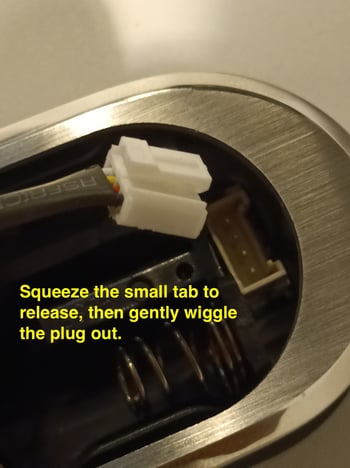
Step 2: Disconnect the Plug
- Locate the small release tab on the connector
- Press (squeeze) the tab
- Gently wiggle the plug out
Do not pull forcefully. Always use the tab.
Step 3: Reconnect the Plug
- Align the connector properly
- Push the plug back in firmly
Step 4: Test the Lock
After reconnecting, check for:
- Beep sounds
- Voice prompts
- Lights turning on
This confirms power is now connected correctly.
Important Tips
- Always handle the connector gently
- Do not force the plug in or out
- Make sure the connection is fully seated
Still Not Working?
If the issue continues, please contact Support and include a video of the problem so we can assist you effectively:
Support@simpled.tech